The quickest way to make an AI agent useful is to give it a database tool. The quickest way to make it dangerous is the same. A tool that runs SQL with a service account’s credentials lets the agent read whatever that account can read, and the agent decides what to ask based on a conversation nobody reviewed. InsightAIShield treats an AI agent as a principal in its own right: it has an identity, its tools are allow-listed, and every query it makes is decided by the same data policies as a person’s, with the result masked or tokenized before it reaches the model. This post works through the two agents of the fictional Northmere Bank and what each may call and see.
In short
- An agent is a principal. Each agent has its own identity and key, its own groups and its own policies, and its own line in the activity record, separate from the person it acts for.
- Two questions per tool call. Is this tool on the agent’s allow-list (and not on its deny-list)? If the tool carries SQL, what do the data policies decide for this agent on this source?
- Same engine, same rewrite. An agent’s SQL is decided, rewritten and limited exactly like a person’s, and its results come back tokenized or masked by rule.
- No tools by default. An agent no AI policy covers may call no tool at all, and an agent never detokenizes.
The service-account problem
Most agent frameworks let a developer attach a tool to an agent in a few lines: a function that takes SQL and returns rows, a search over a knowledge base, a call to a ticketing system. The Model Context Protocol (MCP) makes this even easier, because a tool server can be plugged into any MCP-capable agent. What none of this answers is the access question. The SQL tool connects with some credential, and that credential’s grants become the agent’s grants. In practice that is often a broad read-only role, because nobody knows in advance what the agent will be asked.
Three things go wrong. The agent can read columns it never needs (SSNs, card numbers) and pass them to a model. The agent can be talked into running queries outside its purpose by a user or by an injected instruction in a retrieved document. And the database audit shows only the service account, so nobody can tell which agent, acting for which person, read what.
Agents as principals
In InsightAIShield every AI agent is an identity of kind AI agent, with groups like any person’s.
Northmere has two: the customer support assistant (support-assistant), built on InsightWorker,
and the loan officer copilot (loan-copilot), an InsightStudio app. Each links to its entry in
the InsightControl agent register, so the governance record and the data-access record point at each
other. When an agent connects through the wire proxy with its own database role (the support assistant
uses nm_support_agent), the proxy maps the role to the agent; when it calls the query gateway
or the AI gateway, it authenticates with its own key. Either way the activity record says
support-assistant, not a shared account, and the AI gateway records the person it acts for.

Two policies, two questions
Two kinds of policy apply to an agent, and a tool call can meet both.
The AI policy (ai_prompt_dlp at Northmere) lists the tools the agent may call
and the ones it may never call. Northmere’s agents may call query_gateway,
kb_search and case_lookup; export_csv and send_email are
denied outright. The same policy says which identifiers block or are masked in prompts and responses, and
which models are approved.
The data policy (ai_agent_data) applies to every AI agent on core banking. It
grants read on the accounts table only, tokenizes bank account numbers with the
NUMERIC_SAME_LAST_FOUR format, makes SSNs unreadable, and caps every query at 50 rows. Its
description says it in one line: AI agents read account balances only, through the gateway, with account
numbers tokenized; never SSNs.
A tool call meets the AI policy first and, if it carries SQL, the data policies second. Both decisions are recorded.
What the support assistant can and can’t do
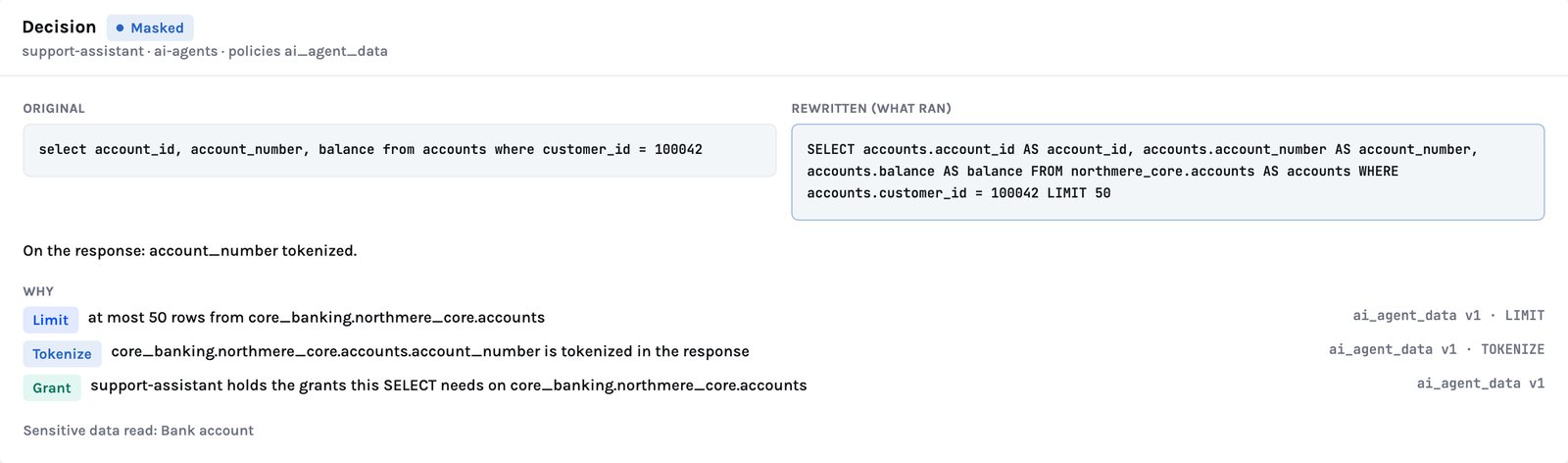
Run the support assistant’s typical query through the policy simulator, the same engine the proxy and
the gateway use, and the decision explains itself. It asks for an account’s id, number and balance for
one customer. The agent holds the grant, so the query runs; the engine adds LIMIT 50 to the SQL,
and on the response the account number is replaced by a token that keeps its shape and last four digits.
The agent can tell the customer which account it means, and nothing it holds or sends to a model is a real
account number.
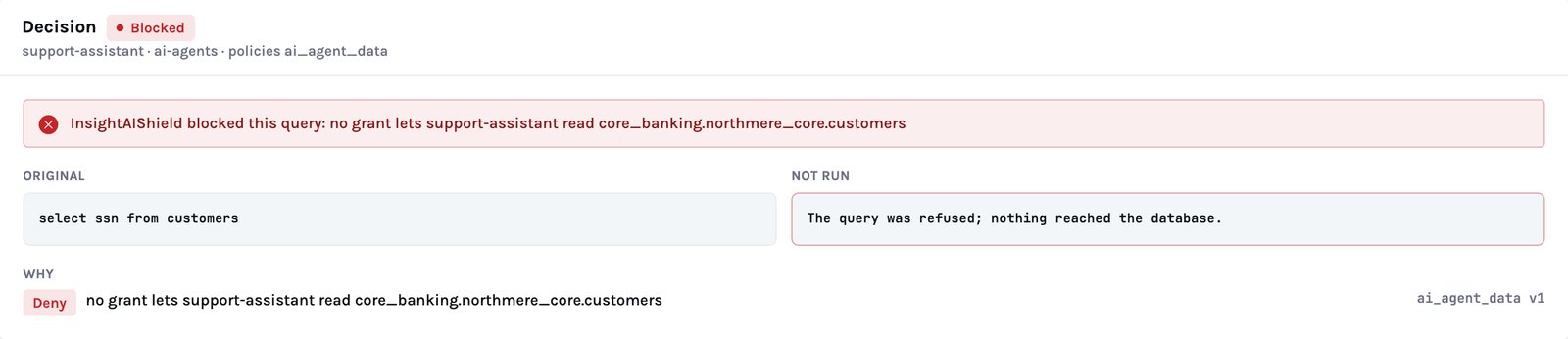
Now the query an agent should never run. select ssn from customers, as the support assistant, is
refused before it reaches the database: no grant lets the agent read the customers table at all. The same
query through the wire proxy, connected as nm_support_agent, gets the same refusal as a
database error the client understands, so an agent framework sees a failed tool call, not an empty
result.
Tool calls on the record
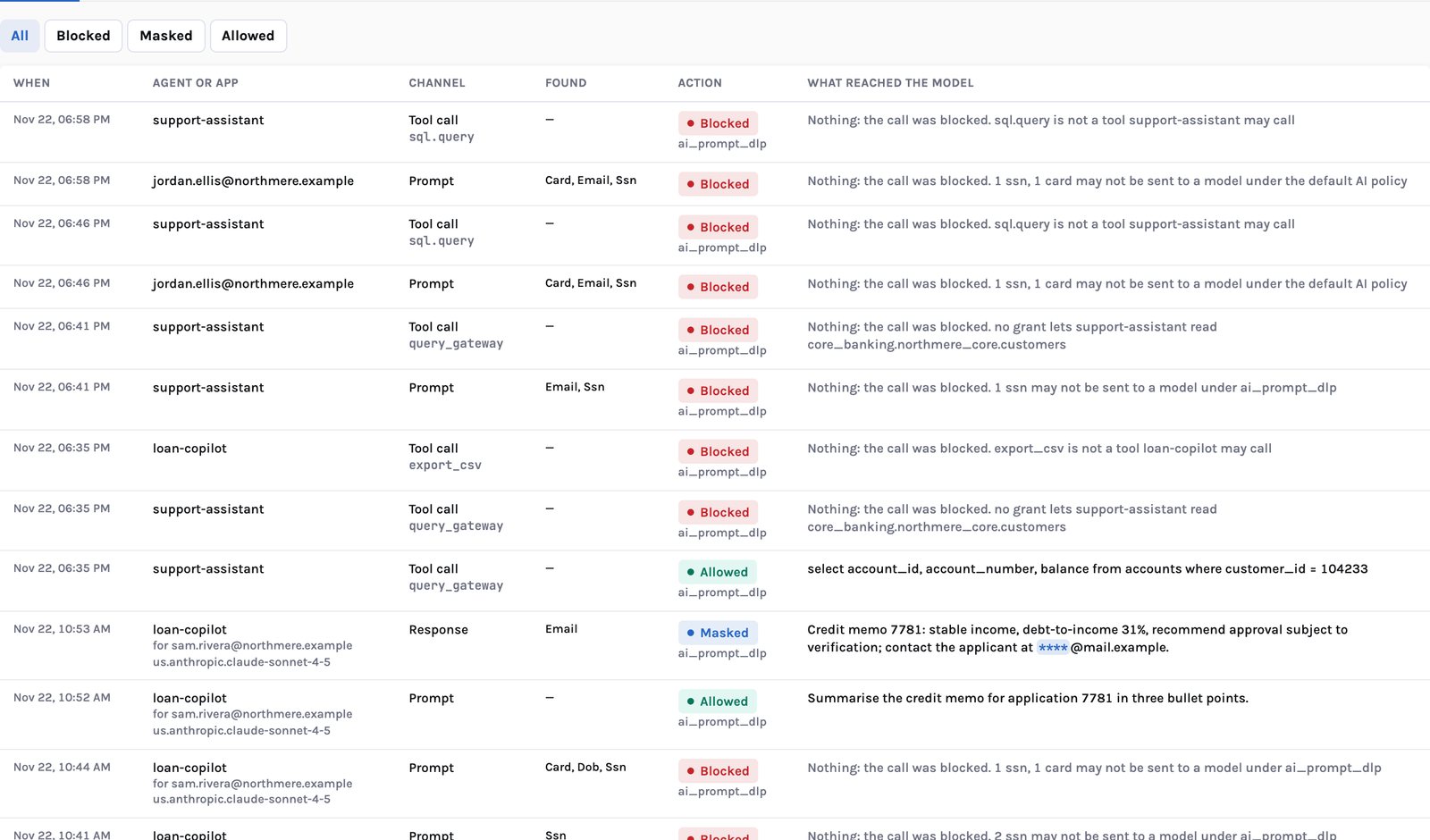
Every tool check is recorded as an AI gateway event on the tool call channel: the agent, the tool,
the action, the policy and its reasons, and the SQL the call carried. On Northmere’s demo the events
show the pattern you want to see. The loan copilot tried export_csv and was blocked, because it
is on the deny-list. The support assistant’s query_gateway call for one customer’s
accounts was allowed and its SQL is shown; its calls that tried to read the customers table were blocked
with “no grant lets support-assistant read core_banking.northmere_core.customers”; a call to a
generic sql.query tool was blocked because that tool isn’t on its list.
Wiring an MCP tool server
The cleanest integration puts the check inside the tool server, so it holds whatever agent connects to it. Before a tool runs, the server asks InsightAIShield whether this agent may call it; if the tool runs SQL, it sends the SQL through the query gateway instead of a direct connection, and gets back rows that are already rewritten, limited and transformed.
from insightshield_sdk import Shield, Blocked

shield = Shield("https://shield.example.com", api_key="…")   # the agent acting as itself

def query_gateway(source, sql):
    shield.check_tool("query_gateway", source=source, sql=sql)   # raises Blocked if denied
    res = shield.query(source, sql)                                    # decided, rewritten, run read-only
    return {"columns": res.columns, "rows": res.rows, "decision": res.decision}
An MCP tool backed by the query gateway. The client holds no policy and no database credential.
The tool server never holds a database credential with broad grants; the gateway runs the query read-only
under the agent’s identity. A refusal raises Blocked with the server’s reason, which
the tool returns to the agent as an error. That matters more than it seems: an agent that receives an
empty result may keep trying variations, while an agent that receives “no grant lets this agent read
customers” can tell the user what it can’t do.
The agent reads whatever the account can, SSNs included; the audit shows the service account; an injected instruction can widen the query.
The agent reads what its own policy grants, with limits and tokens applied; every call names the agent and the person it acts for; anything not granted is refused.
Watching the agents over time
Allow-lists and grants decide each call. Patterns across calls are the anomaly detectors’ job. One detector looks specifically at AI agents whose prompts keep carrying sensitive identifiers the gateway had to mask or block; in the demo it scored the loan copilot after two prompts carried card numbers, dates of birth and SSNs, and the anomaly investigator prepared the next step for a person to accept or reject. The agent was contained by policy each time; the anomaly tells its owner that the workflow feeding it needs fixing.
Kind AI agent, its groups, its database role if it uses the proxy, and its register link.
check_tool before each tool; SQL through query, not a direct connection.
Allowed and denied tools; grants, limits, tokens and blocked fields for its sources. Simulate on its recorded calls.
Nothing goes live on the proposer’s word alone.
Blocked tool calls and masked prompts show where the agent’s design needs changing.
Give the agent a tool, not a credential.
When the tool asks before it acts and the data comes through the same engine as everyone else’s, an AI agent gets exactly the access its policy grants: balances, tokens and refusals with reasons, and a record that names it.
Where people stay in charge
- An agent’s tools and grants change only through a policy version that a second lead activates, so nobody widens an agent’s access on their own word.
- Every agent action is capped at L2, “ask first”: an agent prepares, and a person confirms, activates, revokes, sends or decides.
- A policy version goes live only when a second lead, not the person who proposed it, approves it.
- A revocation is proposed by one reviewer and approved by another; the REVOKE statement is kept on the record for your DBA to run.
- Detokenizing needs a stated purpose, is recorded, and is capped per person per period.
- SIEM batches and attestation requests are held until a person releases them.