Every data-security programme starts with the same uncomfortable question: where is the sensitive data? The honest answer is usually “mostly where we think, plus some places we don’t”. A card number in a dispute note. A date of birth in a marketing extract. A nine-digit column that could be one thing or another. This post follows InsightAIShield through Northmere Bank, a fictional bank with four data sources, from the first read-only harvest to a map of 40 sensitive columns, and shows how it decides what a column holds, how sure it is, and where it hands the decision to a person.
In short
- Harvest read-only. Each connector reads the catalogue (tables, columns, row counts, grants) with credentials given as a secret reference, never a pasted password.
- Three signals per column. The name against a dictionary per data class, a bounded sample of values against validators (Luhn, SSA rules, mod-97, the ABA checksum…), and the column’s type.
- A confidence with its reasons. Each suggestion says why, and quotes only masked samples. Close calls, names and free text go to a review queue.
- People confirm. The data classifier agent prepares one classification per ambiguous column; a person confirms or rejects it, and that word sticks.
Start with an inventory you can trust
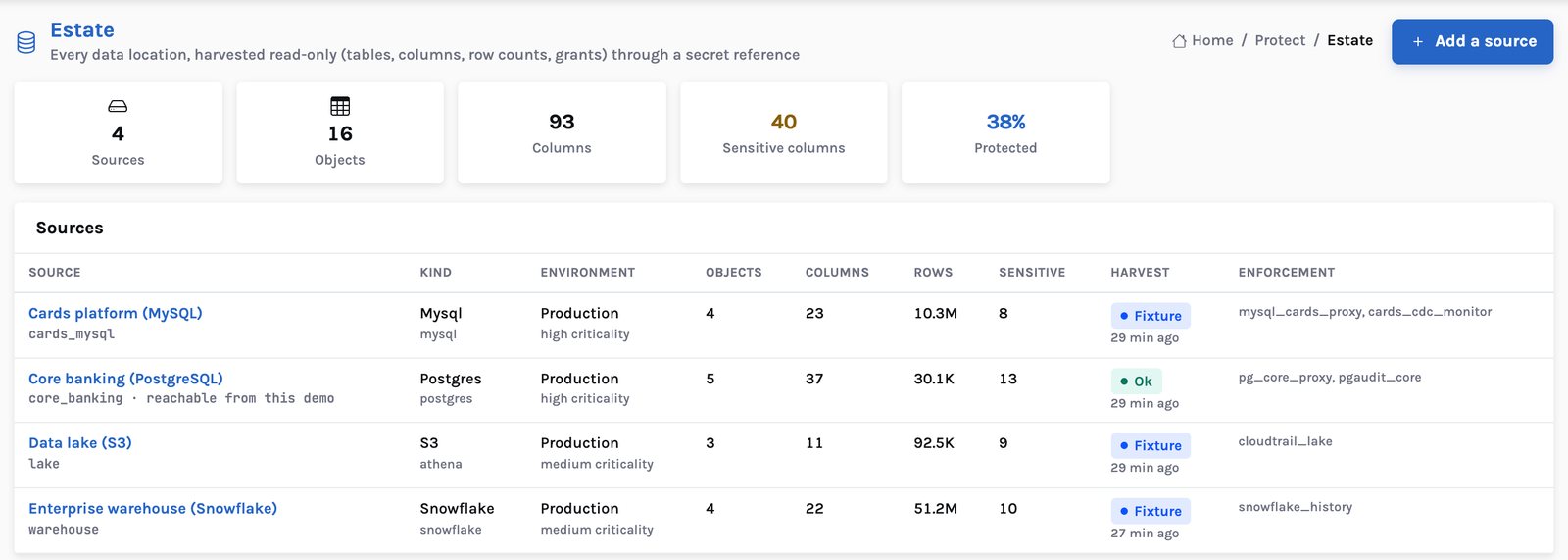
Northmere’s estate has four sources: core banking on PostgreSQL, the cards platform on MySQL, an
enterprise warehouse on Snowflake and a data lake on S3. Each is added as a source with its owner,
business unit, region and criticality, and with a secret reference such as
env://SHIELD_DEMO_PG_PASSWORD. InsightAIShield resolves the reference when it connects;
the password itself is never stored in the product or shown on a screen.
A harvest then reads each source’s catalogue with read-only queries: schemas, tables, columns and types, approximate row counts, and the grants that say who can read what. On PostgreSQL the grants come from the database’s own access-control lists; on core banking that is 101 grants across five tables. When a later harvest no longer sees a table, it is set aside rather than deleted, and a person’s classifications are kept.
Three signals, each with its reason
Classification looks at each column three ways, and every signal that contributes leaves a sentence in the reasons.
Name and values combine; a value score always outranks a name alone. Below the lower threshold, nothing is suggested.
The name. The column name is matched against a dictionary of patterns per data class:
card_number, ssn, dob, iban and so on. Names are
cheap and often right, and just as often misleading: notes, ref and
value say nothing, and a column renamed during a migration may say the wrong thing.
The values. A bounded sample of each column is checked with validators that a random string rarely passes: the Luhn checksum and issuer prefixes for card numbers, the Social Security Administration’s rules for SSNs, mod-97 for IBANs, the ABA checksum for routing numbers, the shape of an ICD-10 code, a dictionary of given names. The share of the sample that validates is the value score.
The type. Some types rule a class out. A four-byte integer cannot hold a sixteen-digit card number, so a card-number suggestion on an integer column is cut sharply whatever its name says.
The confidence combines name and values. When the name says one thing and the values firmly disagree
(a column called card_no whose values fail Luhn), the confidence goes down, not up, and the
reasons say so: “the name alone is weak evidence”.
When the values fit two classes
The most useful thing a classifier can do is say when it isn’t sure, and why. On Northmere’s
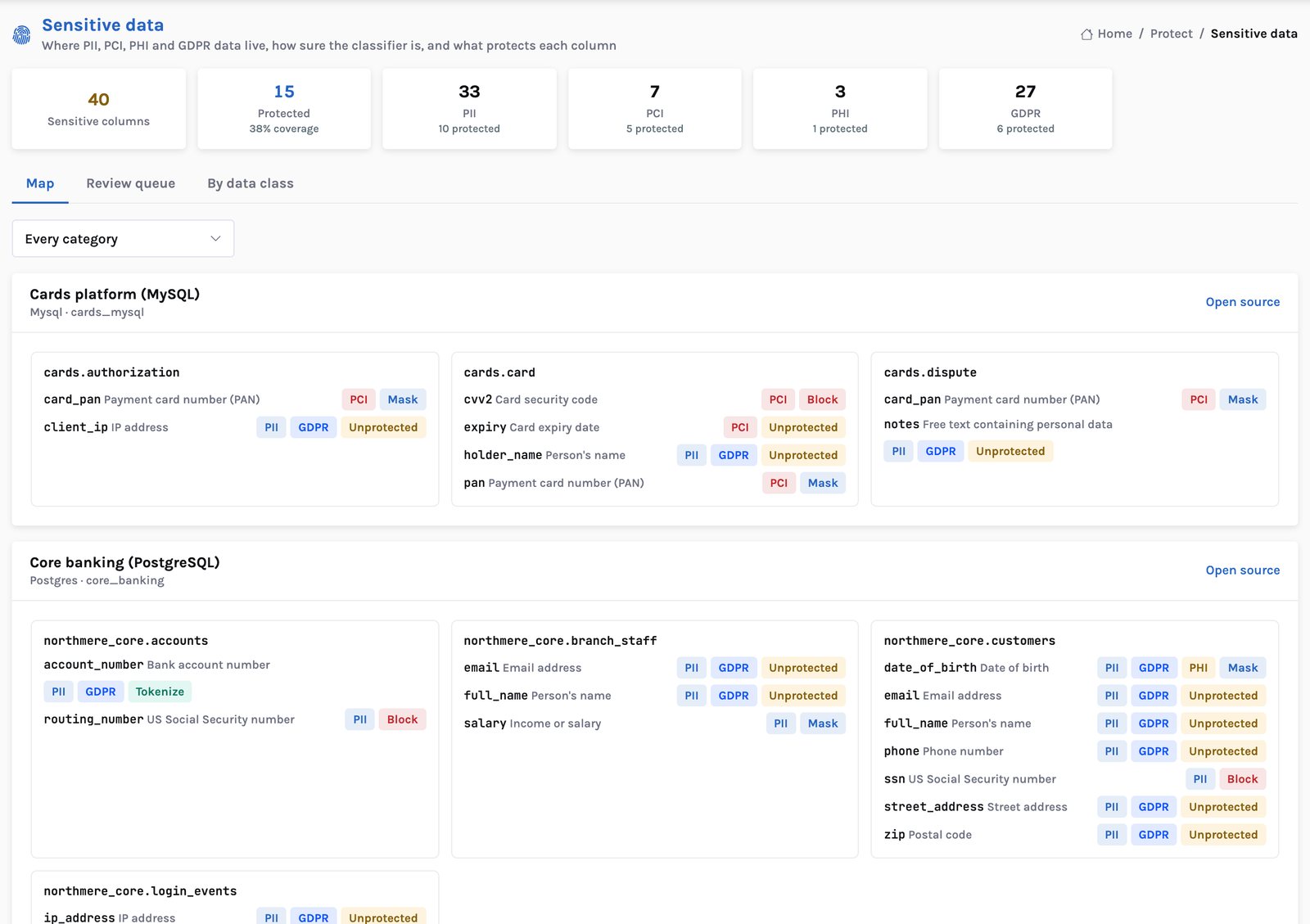
core banking database, the accounts table has a column called routing_number.
Its values are nine digits, and nine digits can satisfy two sets of rules at once: the Social Security
Administration’s area, group and serial rules for SSNs, and the ABA checksum for routing numbers.
The classifier scores both and shows both: all 25 sampled values match the SSN format at 0.90, and the
reasons add “close to ABA routing number (0.88)”. Two classes that close make the column a
close call, so it goes to a person instead of being filed automatically.
That is the right outcome whichever way the answer goes. A dictionary match on the name alone would have filed the column as a bank identifier and moved on; a value match alone would have filed it as an SSN. Showing both scores lets the person who owns the table decide, and the decision is recorded with their name. On Northmere the column is confirmed as an SSN and blocked by policy, the stricter treatment.
This is also why policies are written against data classes rather than column names. Columns get
repurposed and extracts get loaded into the wrong fields, and a policy written against
customers.ssn misses every SSN stored anywhere else. A policy written against
class:ssn covers each column from the moment its classification is confirmed.
The close calls go to a person
Some columns can’t be settled by validators. Free text may or may not contain personal data. A column of names looks like any other list of words. An amount could be a salary or a transaction. For these, and for any suggestion between 0.35 and 0.80, InsightAIShield doesn’t decide. The column goes to the review queue with its suggested class, its confidence, its reasons and up to five masked samples.
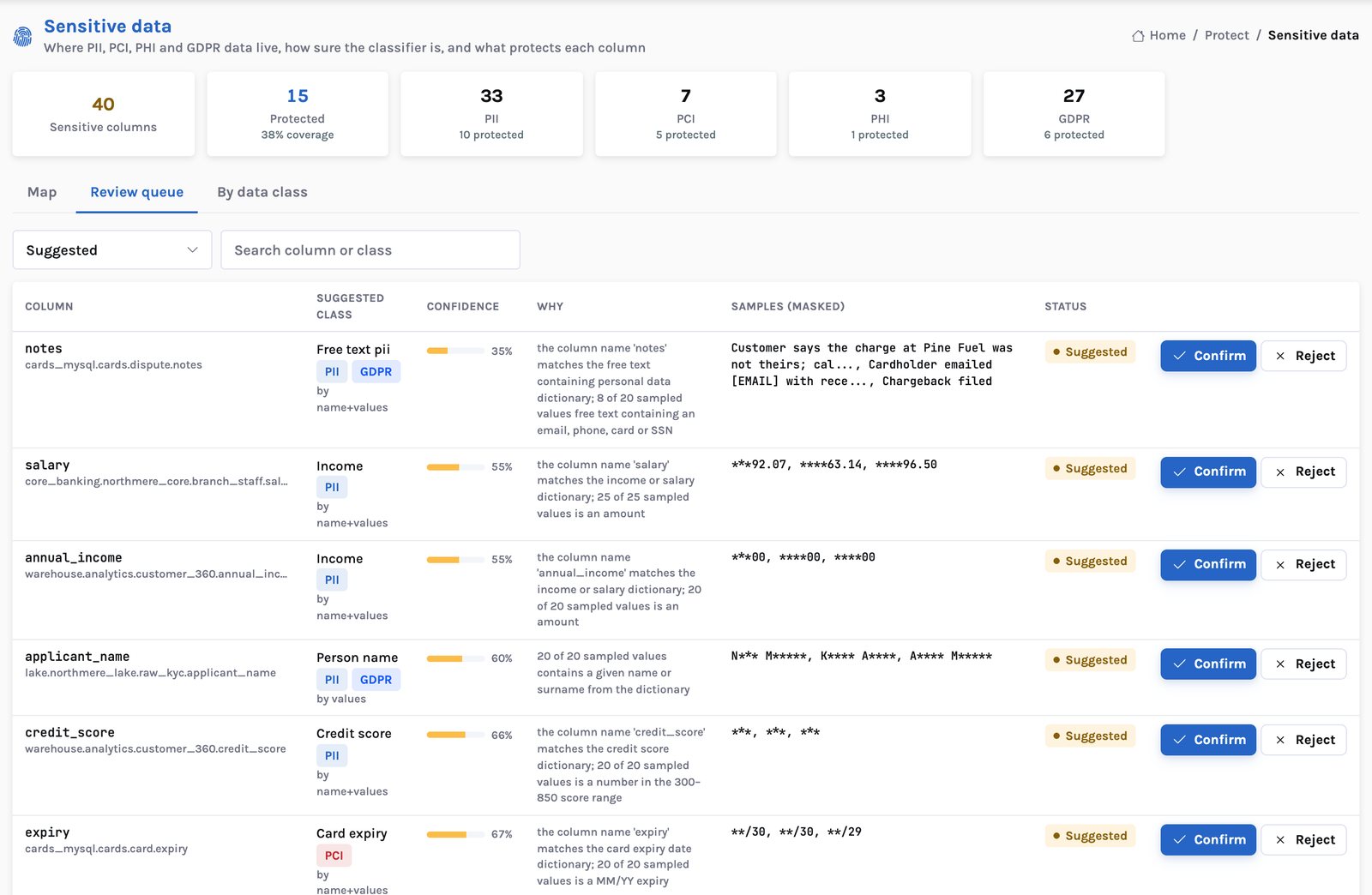
Look at the first row. The notes column on card disputes is free text: 8 of 20 sampled
values contain an email, a phone number, a card number or an SSN. The sample is shown with the
identifiers already replaced ([EMAIL], truncated card digits), because a quoted sample never
leaves the classifier in clear. The reviewer can see enough to decide that agents copy card details into
dispute notes, without the review queue itself becoming a place where card numbers are displayed.
The data classifier agent works this queue. It looks at each ambiguous column with its masked samples and prepares one classification per column, quoting only the samples it was given. It never invents a sample or a class. A person confirms each one.
| Column | Suggested | Confidence | Why it’s a close call |
|---|---|---|---|
cards.dispute.notes | Free text with personal data | 35% | Only some notes carry identifiers |
branch_staff.salary | Income | 55% | Name and amounts agree; amounts are generic |
raw_kyc.applicant_name | Person’s name | 60% | Names are always reviewed |
customer_360.credit_score | Credit score | 66% | Values in the 300–850 range |
cards.card.expiry | Card expiry | 67% | MM/YY values, a short format |
From classification to protection
A map of sensitive columns is only half the job; the other half is knowing which of them nothing protects. Every column on the map shows its protection: the rule type that covers it (Mask, Block, Tokenize, Skip) or “Unprotected”. On Northmere, 15 of the 40 sensitive columns are protected by an active policy, which is the 38% coverage on the estate page and the first factor of the posture score on the home page.
The discovery scout agent closes the loop. After a harvest and classification it prepares two things for a person: the suggested classifications to confirm, and a draft protection policy for the sensitive columns no active policy covers. The draft goes through the same path as any other policy: simulated, proposed, and approved by a second lead before it applies to a single query.
Owner, business unit, region, criticality. The credentials are a reference to the secret store.
Tables, columns, types, row counts and grants from the catalogue.
Name, values and type for each column; a bounded sample, masked before it is stored or shown.
Suggestions at 0.80 or above, each confirmed or rejected by a person.
The agent prepares one classification per ambiguous column; a person confirms or rejects.
The scout’s draft for uncovered columns, replayed and approved with four eyes.
A person’s word sticks
Classification runs again whenever a source is re-harvested, and the estate changes underneath it. What must not change is a decision a person has made. A confirmed classification is never overwritten by a re-scan, and a rejected suggestion doesn’t come back as new. The home page tracks the share of sensitive columns a person has confirmed (11 of 40 on Northmere today) as one of the seven factors of the posture score, so “we found it” and “we agreed what it is” are measured separately.
Trust the values, check the names, ask a person about the rest.
Column names tell you where sensitive data was meant to be. Validated values tell you where it is. InsightAIShield uses both, shows its reasons, keeps samples masked, and leaves the close calls to the people who own the data.
Where people stay in charge
- A suggested classification stays a suggestion until a person confirms it, and a confirmed class is never overwritten by a later scan.
- Every agent action is capped at L2, “ask first”: an agent prepares, and a person confirms, activates, revokes, sends or decides.
- A policy version goes live only when a second lead, not the person who proposed it, approves it.
- A revocation is proposed by one reviewer and approved by another; the REVOKE statement is kept on the record for your DBA to run.
- Detokenizing needs a stated purpose, is recorded, and is capped per person per period.
- SIEM batches and attestation requests are held until a person releases them.